|
Quick File Rename
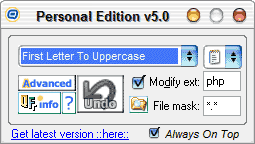 The fastest high performance file and folder renaming application, bar none.
Rename your files and folders in a matter of seconds!! Complete batch file and
folder rename software solution with support for INTERNATIONAL character sets, e.g
Chinese, Japanese, Arabic, Tamil, German, etc. Supports mp3 tagging as well!
The PRO version features powerful recursive renaming.
The fastest high performance file and folder renaming application, bar none.
Rename your files and folders in a matter of seconds!! Complete batch file and
folder rename software solution with support for INTERNATIONAL character sets, e.g
Chinese, Japanese, Arabic, Tamil, German, etc. Supports mp3 tagging as well!
The PRO version features powerful recursive renaming.
Quick File Rename renames your files and folders quickly and easily. Increase your productivity
by renaming files and folders in the thousands, with no risk involved. For webmasters, digital
music enthusiasts, photo collectors and more! See why this is the preferred file rename software of professionals.
| Software Information |
System Requirements |
| Version: | 7.4.5 |
- Windows 8/7/XP/Vista
- Pentium or similar processor
- 512 MB RAM
|
| File Size: | 16.10 MB |
| License: | Free to try, $14.95 to buy |
| Screenshot: | View Screenshot |
| Rating: |  |
Key Features of Quick File Rename :
- Rename files and/or folders.
- Recursion and duplicate name check features (in PRO).
- Character filtering, ignore files / folders with certain characters, e.g the % character.
- Previewing of name changes in REAL-TIME, see what names look like before they are made.
- UNDO feature to allow you to undo the last rename, no risk involved!
- Built-in folder browser to browser drives/folders for files you wish to rename, recognises network drives as well.
- Full unicode support for international character sets, e.g Chinese, Japanese, Arabic, Tamil, German, Russian, etc.
- Funky tooltips explaining the main user interface.
- Enumeration / Serialisation capability, with sort according to Alphabetical or Reverse Alphabetica and the ability to set stepping increments.
- Supports renaming from a custom list, users can now self define which files and folders to rename, as well as their desired names.
- Supports prefixing of parent names, sub folders and files can now take on their parent names.
- Supports Regular Expressions.
- HTML help manual implemented.
- File mask filter allows you to rename files according to their extension, or filename length, eg *.txt, a??.* A??.* help*.???
- Replace strings function allows wildcards, e.g replace ND? with PS on "SOUND1.WAV" results in "SOUPS.WAV" e.g O* with UPER on "SOUND1.WAV" results in "SUPER.WAV".
- DOS 8.3 option will convert all files to the 8.3 format, spaces are converted to underscores, filename is truncated to first 8 chars, and extension is truncated to first 3 chars.
- Enhanced remove string option now accepts wildcards, eg 0?, file*, c*, c???, etc.
- Mixed case rename option, rename files according to your own specification, eg hello_you.txt -> HeLLo_YOU.txt.
- Update time stamp of files, bring your files up-to-date.
- Saving of settings to registry, no more typing in fields again!
- Dialog now takes up 50% less screen space (in mini view) than previous versions (2.0 and below).
- Graphically aesthetic user interface utilising 24-bit icons and bitmapped owner draw buttons.
- Makes use of Windows XP Visual Styles when available.
- LOTS of bug fixes, cleaner code and other changes.
RELATED SOFTWARE DOWNLOADS FOR QUICK FILE RENAME
- EZ Photo Renamer
It is a digital file rename software to quickly rename many digital photo files and picture files.
- MP3 Sorter
It is because all files are neatly arranged in folders and the favorite melody can be found quickly.
- RemoteZip - Remote Zip File Manager
complete ZIP File manager application that runs on your Web server rather than on your networked client machines
- File Valet
An easy to use image management and organization tool
- WebFileExplorer
is a web based file management system with user permissions and quota limits, it has an easy user interface and online administration.
- Advanced File Worker
is a powerful file management, rename and backup utility. You can perform any number of various file operations by pressing ONLY ONE button.
- ReNamer
is a very powerful and flexible file renaming tool
- File Viewer
disk management utility in combination with a viewer
- MsgViewer Pro .msg file viewer
can install itself as the default handler for Outlook .msg files on your computer, making it easy for you view, search and extract file attachments from .msg files.
- Outlook PST Fix
for Microsoft Outlook Personal Storage Files (.pst) designed to recover and restore email from corrupt or damaged PST file.
- BardecodeFiler
Split/rename folders of TIF documents according to barcode.
|
|





 BestShareware.net. All rights reserved.