|
1st Clock
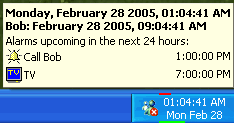 1st Clock is a taskbar clock replacement that offers a fully customizable clock display, alarms,
atomic time synchronization, popup calendar, time zones and more.
1st Clock is a taskbar clock replacement that offers a fully customizable clock display, alarms,
atomic time synchronization, popup calendar, time zones and more.
| Software Information |
System Requirements |
| Version: | 4.0 |
- Windows 8/7/XP/Vista
- Pentium or AMD processor
- 512 MB RAM
|
| File Size: | 1.45 MB |
| License: | Free to try, $29.99 to buy |
| Rating: |  |
Benefits:
- Customize clock display
| More Screenshots |
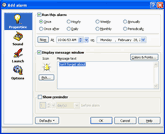
Click each image to enlarge!
|
1st Clock allows you to view the date, time, system resources, and other information in the taskbar in any format you choose.
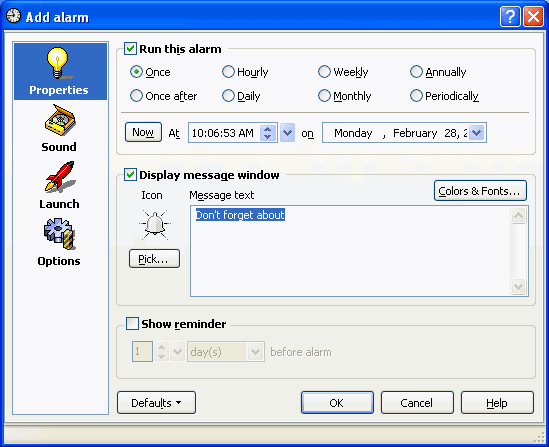
- Add simple and recurrent alarms
1st Clock allows you to add any number of alarms with custom messages, sounds, colors and icons.
- Keep your time synchronized with Atomic Time servers
1st Clock allows you to synchronize time with Internet Atomic Time servers on demand and automatically at specified periods of time.
- Check the time all other the world
1st Clock allows you to view time in any number of time zones in your tooltip. Daylight savings time will automatically be accounted for.
- View the calendar with a single mouse click
You can open the popup calendar by single-clicking on the clock. The calendar allows you to easily add alarms to specified dates by clicking on the date.
- Monitor your computer's performance
You can display the CPU usage and memory load indicators in the taskbar
clock in various colors.
- Add quick reminders for later
- Check the date/time, alarms and time zones in the Advanced Tooltip
- Copy any date/time information to the clipboard
- Display Swatch Internet Time, and more!
RELATED SOFTWARE DOWNLOADS FOR 1ST CLOCK
- MouseClock
With MouseClock, you will always know when you have new e-mail or if your system resources are running low
- Premium Clock
Premium Clock is a compact utility that comprises an analog clock, digital clock, advanced alarm scheduler and a calendar
- Chameleon Clock
It is a digital desktop clock which provides an attractive and useful alternative for the Windows system tray.
- Countdown Clock
The Countdown Clock sits on your desktop so you can monitor the time until your special event.
- Easy Time
It is the diary with integrated alarm clock and reminder program including time synchronization abilities.
- Alarm Master
is a multifunctional personal organizer. It includes talking alarm clock, scheduler, calendar and timer.
- Desktop Atomic Clock
is a program to synchronize your computer clock with an atomic clock over the Internet.
- PC Atomic Sync
is to synchronize your PC's clock in the most reliable and resource-saving way.
- SP Time Sync Pro for Windows NT/2000/XP/2003
is a program with multilingual interface which lets you synchronize your computer's clock with any Internet atomic clock
- ZoneTick World Time Zone Clock
displays the times for any amount of different time zones in place of the normal Windows clock
- Skinny Clock
is a freeware utility helping you to show date and time the way you like it
|
|





 BestShareware.net. All rights reserved.