|
FlashBoot Wizard
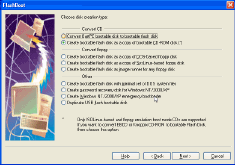 FlashBoot is a tool to make USB storage devices bootable. It supports USB thumbdrives and USB HDDs. FlashBoot partitions, formats USB storage device and then automatically installs operating system files to it. Supported operating systems: Windows 8/7/Vista/XP, SysLinux-based disks, GRUB4DOS disks, Linux kernel etc.
You may create blank bootable USB flash with minimal set of system files and then manually tune it for your needs, or convert a full-featured bootable CD-ROM or floppy disk to bootable USB Flash keeping all functionality.
With its' installation of fully-functional Windows 8 to USB thumbdrive, you can boot windows from USB and carry your OS, your apps, your documents, your browser in the pocket, run it in public library, in internet-cafe, work-from-home etc; At the same time, it is a conversion of Windows installation CD/DVD into bootable USB disk to install Windows XP from USB or to install Windows 7 or Vista from USB on netbooks and other devices without CD/DVD drive.
| Software Information |
System Requirements |
| Version: |
2.2c |
- Windows 8/7/XP/Vista
- 512 MB of RAM
- BIOS with USB boot support
- 30 Mbytes of disk space
|
| File Size: |
Full version: 18.2 MB |
| License: | Free to try, $28.72 to buy |
| Screenshot: | View Screenshot
|
| Rating : |  |
The Features of FlashBoot Wizard :
- Installation of fully-functional Windows 8 to USB thumbdrive
- conversion of Windows installation CD/DVD into bootable USB disk to install Windows XP from USB or to install Windows 7 or Vista from USB on netbooks and other devices without CD/DVD drive.
- convert BartPE bootable CD-ROM to bootable USB disk
- transfer DOS kernel only (you may get the files from installed Windows 9x, from Windows 9x setup folder, or use built-in FreeDOS)
- convert floppy disk to USB Flash disk (a diskette or an image file may be used)
- convert a bootable CD-ROM to USB Flash disk (again images are supported). There are some technical difficulties with supporting any type of CD-ROM here, see details below. But there should be no troubles with the most real cases. You may convert Knoppix and EBCD, for instance.
- create Windows NT/2000/XP password recovery disk
- create disk with NT/2000/XP bootloader. It would be useful when you have mistakenly configured it, and boot.ini file was left on unreachable disk (NTFS).
- duplicate USB flash disk. Just creates a copy of existing disk USB flash disk, different sizes of source and destination medias are OK.
RELATED SOFTWARE DOWNLOADS FOR FLASHBOOT WIZARD
- Paragon Drive Copy Professional
is a cutting-edge solution to deploy new hard drive, migrate data and applications online, create bootable backup copy of a hard drive or its partitions.
- TransXP Professional
creates an exact bootable copy of your old disk
- Disk Doctors Outlook Mail Recovery
is Outlook recovery tool efficiently Recovers messages, folders, appointments, meeting requests, contacts, tasks, task requests, journals and notes in .pst files.
- Remora USB Disk Guard
is a small tool performed as a file encryption switch in your usb drive
- Remora USB File Guard Pro
provides a strong and stable solution to encrypt/compress files and folders which saved to usb disk
- Firestreamer-RM
server grade backup software for Microsoft Windows systems allows you to use the Microsoft Backup Utility (NTBackup) and Microsoft SQL Server Backup (SQLBackup) to back up your data
- HDD Regenerator repairs damaged hard disk drives
HDD Regenerator repairs bad sectors of damaged hard disk drives
- Dispexplorer
It is disk space utility that can be used for better understanding of used space or free space in hard drive.
- EASEUS Partition Manager server
is a partition software for hard disk. With EASEUS Partition Manager server you can create, delete, format partitions on your hard disk quickly.
- Disk Password Protection
is a comprehensive suite of hard-drive protection/access restriction tools.
- EzMigration Software
is designed to do drive to drive backup. It will provide you with an exact duplicate of your drive on another drive.
|
|





 BestShareware.net. All rights reserved.