|
|
WinZip 10.0
WinZip is the original and most popular of all Windows Zip file utilities.
Combining power and flexibility with ease of use, WinZip appeals to the entire spectrum of data-compression users.
First-time users are comfortable with the intuitive WinZip Wizard, while power users appreciate WinZip's seamless
Windows Explorer interface and choose the award-winning WinZip Classic interface for their most sophisticated
compression needs.
WinZip 10.0 includes major usability enhancements, improved compression technology and, is now available in a Standard
and a Pro version. Both the Standard and Pro versions are made available in one distribution file. Functionality is
determined by either a Standard or Pro registration code.
Both the Standard and Pro versions offer new, state-of-the-art compression technology allowing you to make even smaller
Zip files, and a new Explorer-style view of your Zip file contents, making them easier to navigate, modify, and extract.
Other enhancements include: the ability to create split (multi-volume) Zip files during compression, automatic update
checking, and support for the Windows XP SP2 Attachment Manager.
| Software Information |
System Requirements |
| Version: | 10.0 |
- Windows 9x/Me/NT/2000/XP
- Pentium processor
- 64MB RAM
|
| File Size: | 5.56 MB |
| License: | Free to try, $29.95 to buy |
| Screenshot: | View Screenshot |
| Download: | Click to Download |
| Rating: |  |
WinZip 10.0 Features:
- WinZip 10.0 feature a new Explorer-style view of your Zip files,
making it much easier to work with complex, multi-folder archives.
- See the structure of your Zip file at a glance, using a tree-structured view of the folders in your Zip file.
The tree view lets you quickly drill down to see only the items in folders that you want to work with.
This view appears in the left pane of the WinZip Classic window, and is easily switched on or off according to your preference.
- Display only the files and subfolders in the currently selected folder. These items appear in the separate
right pane and can be displayed as tiles, icons, a simple list, or a detailed list.
- Create new folders in your Zip file.
- Add files directly to new or existing folders in your Zip file using drag and drop.
- Quickly extract individual folders and their subfolders by dragging and dropping them to Windows Explorer.
- Easily delete folders and their subfolders from your Zip files.
- Advanced Zip file security Easy-to-use, state-of-the-art AES encryption for your sensitive files.
- Increased Zip file capacity Support for the 64-bit extended format,
which for all practical purposes eliminates the existing restrictions on Zip file size and capacity.
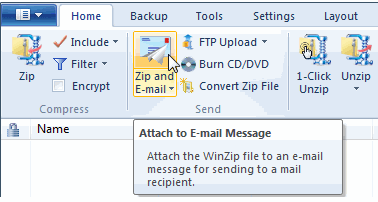
- Tight integration with Windows Zip, unzip, and one-click Zip and E-Mail
directly from Windows Explorer or My Computer.
- WinZip Wizard interface Guides new users through most common WinZip operations.
- Install feature Automatically install software, desktop themes,
and screen savers contained in Zip files.
- Favorite Zip Folders feature Quickly find your Zip files with Favorite Zip Folders.
- Quick Pick Tray icon gives easy access to WinZip and your recently used Zip files.
Installs in the Windows Startup folder so it's ready for use each time you restart your computer.
- Windows XP Take full advantage of Windows XP features including fast user switching and XP themes.
- Internet file support Decode most popular Internet file formats, including MIME, UUEncode, XXEncode, TAR, BinHex, and many others.
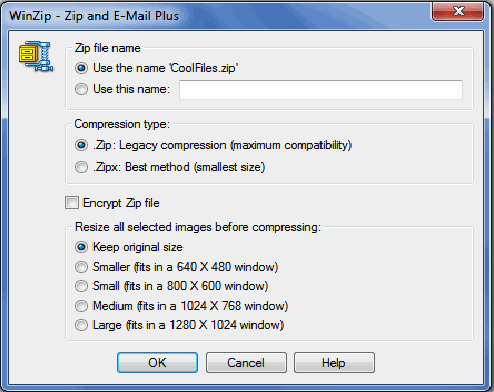
- E-mail support Includes convenient, one-click Zip and E-Mail from Explorer.
- Split Zip file feature Divides archives into user-defined sizes to accommodate e-mail or storage limits.
- Make Executable feature WinZip Self-Extractor Personal Edition allows the creation of self-extracting Zip files,
which are ideal for sending to recipients who may not have an unzip utility.
| More WinZip Screenshots - Click each image to enlarge! |
|
|
|