|
Message Lock for Outlook 2003
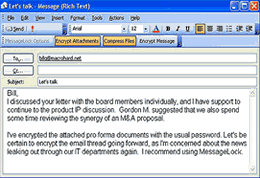 Message Lock is a powerful email encryption solution for any Outlook 2003 user
wanting to protect their email communications and file attachments.
Message Lock is a powerful email encryption solution for any Outlook 2003 user
wanting to protect their email communications and file attachments.
Message Lock for Outlook 2003 - quite possibly the world's easiest to use email encryption
and file compression solution for Microsoft Outlook.
Message Lock plugs into Microsoft Outlook to seamlessly decrypt and encrypt email messages.
It also compresses (and encrypts on demand) email file attachments into a single smaller zip file.
Encrypting email lets you to communicate without fear that eavesdroppers will gain access to your
email messages or file attachments as they are enroute. From the second your encrypted email leaves
your computer, it's contents are protected with strong 256-bit encryption.
Message Lock for Outlook is the first application to fuse new and existing technologies to encrypt email
and file attachments in a patent-pending process that uses:
- strong U.S. Gov't approved advanced encryption standards
- the ubiquitous compatibility of the Zip file compression
- the familiarity of Microsoft Outlook
- the latest .Net 2.0 technology framework, the future of secure computing
| Software Information |
System Requirements |
| Version: | 1.10 |
- Windows 8/7/XP/Vista
- 512 MB RAM.
- 50MB hard drive space.
- 350 MHz Processor.
- Outlook 2000/2002-XP/2003/2007.
- Microsoft .Net Framework.
|
| File Size: | 5.39 MB |
| License: | Free to try, $49.99 to buy |
| Screenshot: | View Screenshot |
| Rating: |  |
Message Lock for Outlook Features:
- With Message Lock, encrypting email in Outlook is easy.
The sender associates an email address with a password, a one-time process that can occur on the fly.
Subsequent email messages to and from that email address will require no password prompting for encryption or decryption.
- With MessageLock for Outlook installed at both the sender and receiver,
email messages are seamlessly encrypted and decrypted. Just send and receive email as you always have.
- Message Lock for Outlook can also compress large email file attachments into
smaller zip files, saving space, transmission time and bandwidth.
You can configure MessageLock to auto-unzip
files you are receiving, or auto-zip files you are sending.
Message Lock knows not to automatically open zip files
that contain nested directories, or dangerous file extensions prohibited by Outlook security.
You can also configure MessageLock to never compress email attachments to particular email address or domains.
- Zip files created by Message Lock for Outlook can be decrypted by any of the popular unzip utilities
that support AES encryption, such as WinRAR, WinZip or PkZip utilities
- Install your license key on up to 3 computers
- Works will all of your email accounts
- Install for multiple computer user accounts
- Strong 256-bit email encryption secures your messages and files
- Automatically decrypt received messages
- Automatically compresses file attachments to save bandwidth
- No behavior changes required
- Conveniently bundles multiple files into a single zip file
- No annoying password prompting after an email address is setup
- Email toolbar lets you toggle encryption and compression on or off
- Supports classic Zip compression standards for broad compatibility
- Encryption options are compatible with the newest releases from leading Zip utilities, as well as older standards
- Your choice of AES256, AES128, Zip2.0, or ML-256 encryption
- Options and automated behavior can be configured by email address or domain
- Always exclude specific domains from compression
- Always exclude specific email addresses from compression
- Exclude certain file types from compression
- Turn off file compression for files less than xxxx KB
- Many other c onfigurable options provide users with flexibility over MessageLock's behavior
- Ease of use allows you to be up and running in just minutes
- Password list exportable to Excel
- No spyware, no adware, no backdoors
RELATED SOFTWARE DOWNLOADS FOR MESSAGE LOCK FOR OUTLOOK 2003
- Encryption Protection
It is the ultimate in data and email encryption software and file shredding.
- G-Lock Email Processor
powerful tool designed to automatically process incoming Internet email such as bounced/undeliverable messages
- The Bat! Professional Edition
Access multiple accounts with this powerful, highly configurable, yet easy to use, email client.
- Outlook Password Recovery
Recovers lost passwords for any MS Outlook 97/98/2000/XP/2003 files
- eCipher
is the easiest way to protect your email communications can help you send secure email directly through web-based email programs like Gmail, AOL, Yahoo!
- JvCrypt
It is a powerful encryption and compression utility that allows you to encrypt your sensitive files with ease.
- Crippin CAB Files
Crippin encrypted files are generally less than half the size of the originals, so it can be used for compression too.
- ZipZap- Archive Software for Pocket PC
is an archive software designed for Pocket PC
- TrueMirror
is a tool for easy and reliable symmetric file synchronization with transparent ZIP compression and AES encryption for Macintosh, Windows, Linux and UNIX.
- Lockspam Pro - safe spam blocker
safe spam blocker for POP3 mail clients, like Microsoft Outlook, Outlook Express, Eudora, Incredimail, Mozilla, Foxmail, i.Scribe and many others
- WinLock Professional
is a powerful security solution that lets you restrict access to various computer resources.
|
|





 BestShareware.net. All rights reserved.