|
GroupCalendar for Outlook
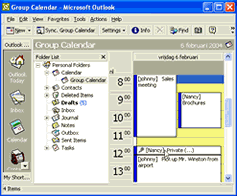 Share Outlook® schedules in a group calendar and create appointments for others?.. All you need is a networked pc!
Up until now it was almost impossible to get a good overview of your co-worker
calendars and appointments integrated with Outlook. GroupCalendar is an
easy to install Outlook add-on, which solves that problem effectively
and flexibly. In addition to allowing group viewing of calendars, GroupCalendar
also allows you to create and edit appointments on behalf of others. All
of these features are available using nothing more then a peer to peer
network or LAN - no server software is required.
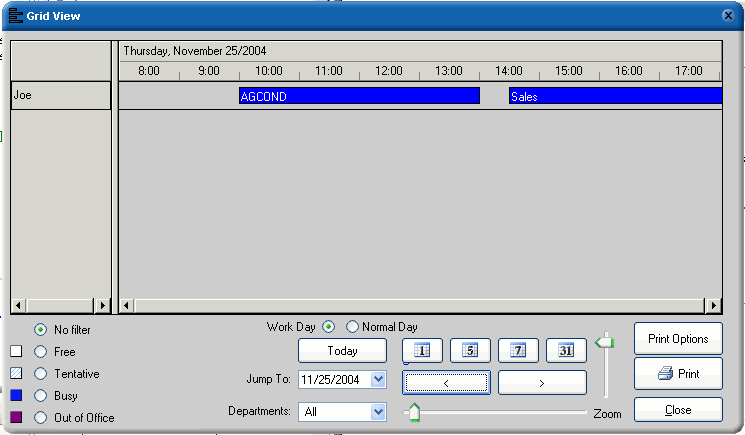
GroupCalendar's grid view feature shows the available group information in real time.
With great filtering options and printable.
GroupCalendar support languages : English, German, French, Portuguese and Other.
| Software Information |
System Requirements |
| Version: | 1.6.85 |
- Windows 9x/Me/NT/2000/XP/2003
- Windows CE / Pocket PC
- Pentium or similar processor
- Outlook 2000 / XP of 2003
- 64MB RAM
|
| File Size: | 6.27 MB |
| License: | Free to try, $85.93 to buy |
| Screenshot: | View Screenshot |
| Rating: |  |
GroupCalendar for Outlook Functions:
- View (grid view)
The Grid View shows the contents of the GroupCalendar database in real-time. As such it is independent of
the synchronization settings that keep the Group Calendar folder in Outlook up to date with the database.
Apart from that it has some great filtering and grouping options built-in that are hard to achieve in Outlook alone.
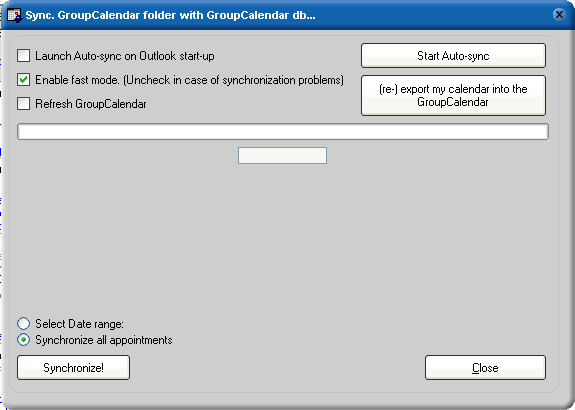
- Synchronization
Synchronization is the process that shows the user in Outlook what other users have in their personal calendars.
Synchronization translates database records to appointments in the Outlook group calendar folder.
It also creates appointments in the personal calendar of the user when another user created that in
the group calendar for that user.
Synchronization also cleans out old appointments from the Outlook group calendar folder if those appointments
are no longer related to a database record because the owner of the appointment removed it from their personal
calendar or applied the 'hide string @@@' to that appointment.
Benefits:
- Flexible - Works without a server and with a laptop on the road.
- Easy to install - Start the setup, adjust one setting and the office has a shared calendar.
- Easy to use - No actions required to share. Needs only one click for private or hidden appointments
- Effective - Create appointments for others directly in the Group Calendar in Outlook.
- Support - Fast & friendly helpdesk, response to email questions in under one hour, direct connect phone hotline
- Fair - 3 years of free support and free updates, no annual fees, no additional costs.
RELATED SOFTWARE DOWNLOADS FOR GROUPCALENDAR FOR OUTLOOK
- Moto Calendar
Powerful visual and audio features of the Moto calendar desktop software program allow you to easily and quickly manage
- Calendar Reminder Software
Birthday Calendar Reminder is a newly designed reminder program offering more powerful function and much easier to use than Ultra Calendar Reminder.
- Easy Calendar Maker
Allows you to create customized photo calendars using your own photographs.
- AcreSoft 2007 Calendar Software
is designed to keep track of jobs, schedules, appointments, birthdays, anniversaries, etc.
- Munia
quick and easy-to-use scheduling program that allows you to effectively and efficiently manage your accounts and appointments
- SynchPst for Outlook
the easy way to synchronize data among two personal folders. Just choose either single or multiple
- My Zodiac Calendar
Here is the program that is a fully featured calendar and an astrology companion at the same time.
- NVN (for Outlook)
It displays appointments and tasks on your desktop so you don’t loose track. The desktop image remains fully visible.
- XemiCo Today Calendar
reads information directly from Pocket Outlook and depending on how busy you are it colors dates in its calendar.
|
|





 BestShareware.net. All rights reserved.