|
FastFolders
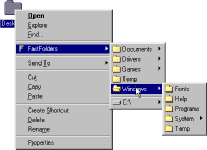 This system extension increases your productivity dramatically by giving you quick and easy access to folder
contents and files. Without opening each and every folder, you can browse the directory structure starting at
any point by clicking the right mouse button on a file, folder or drive. The program adds a menu item to the
context menus of shell objects, which displays the directory structure on demand. If you drag and drop an object
on a folder or drive using the right mouse button, you can copy or move the object(s) to any folder of your
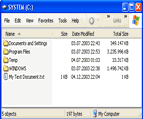
computer by selecting it from the FastFolders menu. FastFolders also adds a new column to the "Details" view
of Explorer windows, which shows the total size of folders including their subfolders and files. This is
extremely useful for getting an overview of the distribution of your files and the disk space they occupy.
This system extension increases your productivity dramatically by giving you quick and easy access to folder
contents and files. Without opening each and every folder, you can browse the directory structure starting at
any point by clicking the right mouse button on a file, folder or drive. The program adds a menu item to the
context menus of shell objects, which displays the directory structure on demand. If you drag and drop an object
on a folder or drive using the right mouse button, you can copy or move the object(s) to any folder of your
computer by selecting it from the FastFolders menu. FastFolders also adds a new column to the "Details" view
of Explorer windows, which shows the total size of folders including their subfolders and files. This is
extremely useful for getting an overview of the distribution of your files and the disk space they occupy.
| Software Information |
System Requirements |
| Version: | 4.1.1 |
- Windows ME, NT, 2000, XP, 2003, Vista
- Pentium processor
- 32MB RAM
|
| File Size: | 526 KB |
| License: | Free to try, $15.00 to buy |
| Screenshot: | View Screenshot |
| Rating: |  |
Key Features of FastFolders :
- Modifies the context menu of folders and files, adding a menu item which displays the directory structure on demand
- All shell objects can be browsed (including My Computer, Control Panel, Network Neighborhood, etc.)
- Right-button Drag & Drop: If you drag and drop an object on a folder or drive using the right mouse button, you can copy or move the object(s) to any folder of your computer by selecting it from the FastFolders menu
- Large directories can be split up into multiple columns for easy access
- In addition to folders, any file types can be included in the directory structure, to give you fast access to these files
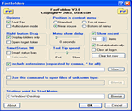
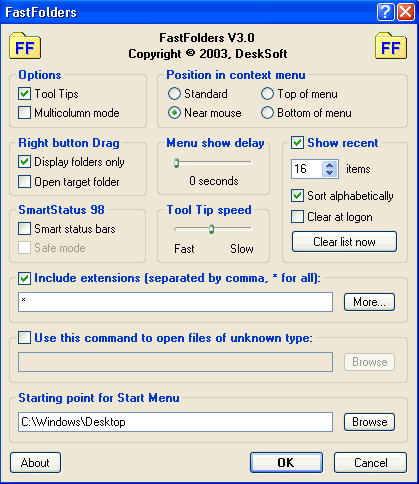
- Adjustable menu speed and many other options to customize the product
- Adds a column to the "Details" view of Explorer windows, which shows the total size of folders (Windows ME, 2000, XP or higher)
- Pressing "C" on an item will copy a list of contents of this item to the clipboard (like a directory listing). "SHIFT+C" includes file size information
- Windows XP: pressing "CTRL" when clicking a FastFolders item keeps the FastFolders menu open
- Windows XP: pressing "SHIFT" when clicking a FastFolders item will open it in an explorer instead of a normal window
- Includes SmartStatus 98, the revolutionary feature for Windows 98 which resizes the items of the status bars of all Explorer windows, to fit all important information (e.g. file sizes) optimally
- and much more...
| More Screenshots - Click each image to enlarge! |
|
|
RELATED SOFTWARE DOWNLOADS FOR FASTFOLDERS
- File/Folder Description Center
a cataloging system that helps you easily view and keep descriptions of Windows'95/98/NT4/2000 folders and files, ZIP and RAR archives, WWW HTM/HTML pages. 4DOS compatible file format: Descript.ion, File_id.diz, Dirinfo
- Quick File Rename
Quick File Rename renames your files and folders quickly and easily
- FileSync
most complete solution for keeping files up to date between your notebook and desktop or workstation and server
- Hide Secret Files
a security product based on an unequalled data hiding method
- Instant Lock - Lock and hide folders
folder lock software to Lock and hide folders in Windows XP 2000 NT 98. Security tool for hiding files & folders
- X-Fonter
is an advanced font manager, especially created for web-designers, graphic artists and font fanatics.
- OLFolderSync
can synchronize any Microsoft Outlook folder through the internet without the need for both parties to be online at the same time.
- OLMixedFolders
can synchronize any Microsoft Outlook folder with the Outlook default folders
- Folder Armor
is Real Folder Protection software, protects your folders in Windows, DOS, and Safe modes, even when you change your OS or boot from a disk.
- Folderico
is a free software that Allows to change icons of the chosen folder to any chosen by you.
- Folder Lock
is file lock & file encryption software to password protect folders on drive and USB.
- Virtual Folder
allows you to rearrange your files without moving them, and it maps your mostly used folders into a virtual driver ..
|
|





 BestShareware.net. All rights reserved.