|
QueIt Scheduler
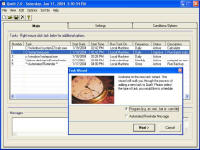 QueIt for Microsoft Windows is a powerful scheduling utility that allows you to schedule programs,
tasks, or even MS-DOS batch files to automatically launch at specified times you choose.
With QueIt you are able to schedule a program to launch when you want and as often as you want.
QueIt for Microsoft Windows is a powerful scheduling utility that allows you to schedule programs,
tasks, or even MS-DOS batch files to automatically launch at specified times you choose.
With QueIt you are able to schedule a program to launch when you want and as often as you want.
With QueIt, you can also send automatic email messages, execute tasks remotely i.e. different machines
on your network), pass command line arguments to your scheduled program. QueIt even supports
conditional launches (i.e. don't execute unless a specified file exists).
| Software Information |
System Requirements |
| Version: | 2.10 |
- Windows 8/7/XP/Vista
- Pentium - II or Higher
- Memory: 512 MB RAM
- Disk Space 10 MB
|
| File Size: | 2.97 MB |
| License: | Free to try, $39.95 to buy |
| Screenshot: | View Screenshot |
| Rating : |  |
QueIt Scheduler Features:
- Schedule tasks to launch when you want.
With QueIt you are able to schedule a program, task or batch file to run every month, day, hour or
even every minute. Tasks can be scheduled day or night!
- Send automatic email messages.
An automatic email message can be sent to one or more specified email addresses at the time a task
is launched or completed.
- Execute tasks remotely.
With the QueServer add-on, you have the ability to execute tasks on diffrent machines contained
on your network. Once QueServer is installed, it will "listen" for instructions from QueIt to
execute tasks locally on the machine QueServer is installed on by using the CPU of that machine
and not the machine QueIt is installed on. By installing QueServer on several machines,
you are able to distribute the processing of multiple tasks across multiple machines and
are only required to have one install of QueIt that sends instructions to the remote machines
that have QueServer installed on.
- Only launch a program if a specified file exists.
For example, you want to launch Microsoft Excel ONLY if a file by the name of "today.txt"
exists in a specified folder, QueIt would wait until this file exists prior to launching Excel.
You can have QueIt wait indefinitely or you can set QueIt up to have the task "time out" after a
specified number of hours.
- Automated reminders.
With QueIt you can schedule reminder messages to popup on you screen. You can also configure QueIt
to auto-email a reminder message to one or more email addresses.
- Automatically stop a task.
You can configure QueIt to stop a task after it has been running for a specified number of
hours or minutes. For example, if you scheduled Microsoft Internet Explorer to launch at
8:00 AM and then selected the "Stop Task After" option with a value of 1 hour, QueIt would
launch Explorer at 8:00 AM and then close Explorer at 9:00 AM.
- Provide command line arguments to the program that is being scheduled.
For example, if you schedule Microsoft Excel with a command line argument of "my_spreadsheet.xls",
QueIt would then launch Excel and open the "my_spreadsheet.xls" spreadsheet.
- Detailed log information.
QueIt logs every task that is successfully launched or any task that fails to launch.
- Launch a task with "High System Priority".
Launching a task with high system priority will enable certain applications to run faster on your CPU.
You can also launch tasks with "Low System Priority".
- When minimized, QueIt runs unattended and remains as an icon in your system tray.
If your computer is shutdown, QueIt will automatically be restored once your computer is re-booted.
- Run QueIt as a Windows Service.
If you have Windows XP, Windows 2000 or Windows NT, you can run QueIt as a Windows service.
This option will allow you to launch tasks even when your logged off.
RELATED SOFTWARE DOWNLOADS FOR QUEIT SCHEDULER
- FTP Scheduler Pro
FTP Scheduler was engineered with automation in mind. Strictly for businesses that require ftp'ng of files on a regular basis and requiring an audit trail to ensure data was Sent/Received as perceived
- Appointment Book - Appointment scheduler Software
is an appointment scheduler Software for professional and small business offices.
- MailPerfect
email filtering software which sits behind an email client such as Outlook Express
- Rich Mailer
Rich Mailer help you maintain subscription-based mailing lists and send personalized e-mail messages
- FinaleMail
It is the email recovery software designed to Recover all email messages and attachments lost by virus infection...
- Medical Calendar
is an easy-to-use scheduler for doctors that’ll free you from a great deal of writing routine
- Shift Scheduler Continuous Excel
will build a roster structure to your specifications, allocate staff automatically, and generate a printable roster, all at the click of a button.
- Absence Management System
is a powerful Absenteeism & Attendance Management application that provides timely management information on the effects of absenteeism
- Advanced Task Scheduler
is a multifunctional task scheduler, which allows launching programs and batch files, opening documents
- Say the Time
will keep you on schedule by automatically announcing the date, time or both at specified intervals using a pleasant male or female voice.
|
|





 BestShareware.net. All rights reserved.