|
PictureNook
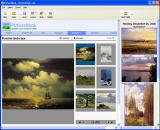 Make you web photo album in a minute with aid of new web gallery making software. Select your pictures,
choose gallery layout then follow the web deploying wizard and your new photo album becomes available
to your friends. Every time you modify your gallery you can view on screen how the gallery will look
when it is displayed in a web browser. Several well designed layouts and visual styles included to save your time.
Make you web photo album in a minute with aid of new web gallery making software. Select your pictures,
choose gallery layout then follow the web deploying wizard and your new photo album becomes available
to your friends. Every time you modify your gallery you can view on screen how the gallery will look
when it is displayed in a web browser. Several well designed layouts and visual styles included to save your time.
If you publish digital photos on your web site, PictureNook is program for you.
| Software Information |
System Requirements |
| Version: | 2.0 |
- Windows 2000, XP, 2003, Vista
- Pentium II CPU
- 64 MB RAM
- Microsoft .NET 2.0 Framework
|
| File Size: | 1.54 MB |
| License: | Free to try, $19.90 to buy |
| Screenshot: | View Screenshot |
| Rating : |  |
General Features:
- 14 preinstalled gallery layouts
- 5 preinstalled gallery styles
- Ability to create your own gallery layouts and styles
- Slideshow
- Picture watermarks
- Text signatures
- Multi-level galleries
- Content pages with pictures collage
- Rename/Resize/Rotate/Rearrange pictures
- Text descriptions/notes
- Deploy gallery to folder/FTP
- What you see is what you get interface
- Google ads ready
Make web photo gallery in three easy steps:
- Select your photos
Press "Open folder..." button on PictureNook tool bar and choose a folder with your photos.
- Add your photos to the gallery
Navigate mouse pointer on the picture and click on the double arrow graphical pop-up menu item to
move your photos from PictureNook folder pane to gallery view.
- Deploy to web site via FTP or store locally
Press "Deploy..." button on PictureNook tool bar and publish your gallery to web site or
store locally with aid of PictureNook gallery deployment wizard.
RELATED SOFTWARE DOWNLOADS FOR PICTURENOOK
*
- Pics PowerStudio Multimedia Photo Album
PicsPowerStudio is a digital album specially designed to View Catalog Manage and Share Your Erotic Videos and Pictures
- PicaJet FX
PicaJet is a photo organizer, digital photo album, Photo Management Software that offers direct import from your camera, image sharing via email or web gallery
- EZ Thumbnail Builder
It is an easy-to-use thumbnail and photo album software to quickly create online digital photo album and web thumbnail galleries.
- QR Photo DVD Slideshow
It is an absolutely powerful yet easy-to-use tool to create stunning slideshows with your digital photos for display on TV.
- Virtual Album Maker - make 3D virtual album
is an easy to use digital photo album maker software, can create photo slide shows and make 3D virtual album, Screensavers
- Wondershare Flash Album Studio
Create flash albums with effects and animations from your photos
- Wondershare Photo Story Platinum
is a powerful yet easy-to-use utility to create dvd photo albums, photo album for iPod, PSP, Zune
- Fortop Album Creator
is a unique software of fun and easy to use for creating impressive flash digital photo albums.
- iWebAlbum
is a free program which allows you to create great-looking web photo albums.
- Instant Gallery Maker
allow you to quickly create professional-looking web image galleries ready to be published on the Web.
|
|





 BestShareware.net. All rights reserved.