| Make BestShareware.net your home page | Add BestShareware.net to your favorites |
 Homepage |
 Help Desk |
 Site Map |
 |
 Popular |
 What's New |
 Featured |
| MAC Software | Linux Software | Pocket PC | iPod Software | Zune Software |
|
HandyFTP - FTP upload tool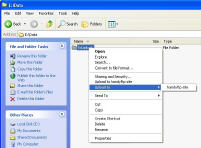 If you routinely upload files via FTP, HandyFTP is program for you. With HandyFTP you can start upload in seconds,
with three mouse clicks, quick and easy.
If you routinely upload files via FTP, HandyFTP is program for you. With HandyFTP you can start upload in seconds,
with three mouse clicks, quick and easy.The reason why this program was created is author's lazyness. Once upon a time it happens that author needed to frequently upload web pages and other files like images to his FTP server. So, each time he put away his work, opens up some ftp client and, after some clicking and typing, going through dialog boxes and watching progress indicators, he does upload. Why do I need all that, he thought. And then he thought at the moment what does he basically need to start upload? First, he needs something to upload. Second, he needs to know server name and his login to that server. That's all - and that is how HandyFTP tool was born. FTP upload tool for lazy people. Something to upload, server name and login - the only things that are required for HandyFTP to work. Setup server name and login once. Now just point to something you want to upload right in your explorer window, right-click and choose destination. Program just silently does the task without bothering you again. Quite handy. Supports secure authentication (OTP-MD5).
HandyFTP Features:
|
||||||||||||||||||||


|
Submit Software |
Privacy Policy |
Terms of Use |
Advertise with Us |
Contact Us
Copyright ©  BestShareware.net. All rights reserved.
|