|
Easy Made Memories
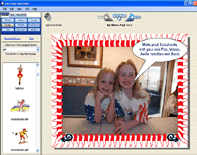 Easy Made Memories is a incredibly Easy-To-Use FREE scrapbook program that will turn your photos, videos,
and audio clips into professional quality DVDs, complete with your own DVD disk and Cover graphics.
Over 2000 scraps, die cuts, backgrounds, borders, and audio clips supplied free.
Import the movies from your digital camera, or narrate your scrapbook with your own voice and music.
Preview your scrapbook exactly as it will appear on your TV. You can also print your scrapbook or view it on your PC.
Great for scrapbookers, but also a wonderful tool for musicians making demo DVDs,
for educators making professional DVD tutorials, for marketers creating sales materials, and more.
Keep your precious digital memories safe for decades to come in DVD format!
Easy Made Memories is a incredibly Easy-To-Use FREE scrapbook program that will turn your photos, videos,
and audio clips into professional quality DVDs, complete with your own DVD disk and Cover graphics.
Over 2000 scraps, die cuts, backgrounds, borders, and audio clips supplied free.
Import the movies from your digital camera, or narrate your scrapbook with your own voice and music.
Preview your scrapbook exactly as it will appear on your TV. You can also print your scrapbook or view it on your PC.
Great for scrapbookers, but also a wonderful tool for musicians making demo DVDs,
for educators making professional DVD tutorials, for marketers creating sales materials, and more.
Keep your precious digital memories safe for decades to come in DVD format!
| Software Information |
System Requirements |
| Version: | 2.0 |
- Windows 98/ME/NT/2000/XP
- Pentium II CPU
- 64 MB RAM
- Microsoft .NET Framework 2.0
|
| File Size: | 37.90 MB |
| License: | Freeware |
| Screenshot: | View Screenshot |
| Rating : |  |
How easy is Easy Made Memories? Easy!
Making a DVD that last generations is as easy as 1,2,3,4. Below we will graphically
outline the basic steps to make a great DVD Scrapbook. We hope that this will answer
most of your questions, but if not, visit our Message Boards, where you may well find someone
else with the same problem or question you have!
- Create
Import your photos, your videos and your audio clips.
You create your scrapbook pages using your own material and our many included scraps, borders, backgrounds,
color-changing die cuts, text, and audio clips. Using the 'download scraps', and 'download audio clips' links,
you can bring in more scraps, backgrounds, die cuts, audio clips and more, most of it free of charge!
You'll be able to resize, rotate, flip, mirror, squish and stretch your scraps, layer them,
cut & paste them and even change color on many of the scraps and backgrounds..
- View (Organize)
The 'View' tab contains both Organize and Preview. Organize allow you to see at a glance all your scrapbook pages.
You can delete pages, add new pages, copy and paste present pages,
and even reorder pages by simply dragging and dropping them.
- View (Preview)
The 'View' tab contains both Organize and Preview.Preview is designed to show you just how your Scrapbook will appear
on your TV, we even give you a DVD Remote control to control the scrapbook.
You can also see the size of your Scrapbook as a % of the maximum size.
- Make DVD (Disk)
The 'Make DVD' tab contains Disk, Cover, and Order DVD functions. This allows you to create graphics for your DVD disk and the DVD Cover, as well as Order your DVD when you are ready. You can switch between editing Disk and Cover by simply clicking on the icons at the top of the page.
- Make DVD (Cover)
The 'Make DVD' tab contains Disk, Cover, and Order DVD functions. This allows you to create graphics for your DVD disk and the DVD Cover, as well as Order your DVD when you are ready. You can switch between editing Disk and Cover by simply clicking on the icons at the top of the page.
RELATED SOFTWARE DOWNLOADS FOR EASY MADE MEMORIES
- Wondershare Scrapbook Studio
allows to create eye-catching photo scrapbook
- Virtual Album Maker - make 3D virtual album
is an easy to use digital photo album maker software, can create photo slide shows and make 3D virtual album, Screensavers
- Automatic Photo Sorter
allow you to rename both groups of photos according to the template you specify and separate photos one by one
- Audio Recorder for Free
Record any sound from your sound card and save the recording directly to MP3, WMA, or WAV files.
- dvdXSoft Sound Recorder XP
enables you to record sound, played back through your sound card and any other sound sources like microphone,VCR, Line in, Telephone,Data CD,DVD,Audio tape player etc.
- Personal Audio Recorder Pro for Palm
turns your Treo600(R)/650 /700P smartphone, Palm Tungsten T/T2/T3/Z72, LifeDrive into an audio recorder and POD broadcasting tool.
- WinAudio Recorder
is an easy-to-use tool for recording all kinds of sound from sound card with high quality
- Mobile Photo Frame
is a picture editing mobile application that let you add stylish frames, clip art ,line and text for your digital photo.
- Photo Gadget Pro
is a shell extension that adds image editing options to Windows Explorer.
- 7tools Easy CD/DVD Recorder
easy CD/DVD Recorder makes recording files and folders to CD/DVDs as simple, convenient and quick as possible.
- Your Honey Frame
Frame your photos images pictures!
- ScrapBook for Palm OS
is a note-taking application can search its database for multiple strings at once, searching keywords, titles, and (optionally) full message texts.
|
|





 BestShareware.net. All rights reserved.