|
CastleBar
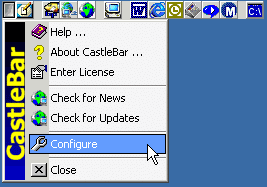 CastleBar is a powerful yet simple toolbar menu to allow you to quickly launch applications or open folders.
Keep it out of the way in the titlebar area or let it float wherever you want it.
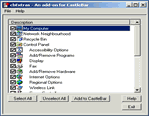
Set up buttons to open the Control Panel, the Network Neighborhood, the Recycle Bin,
or almost anything else you can think of.
CastleBar is a powerful yet simple toolbar menu to allow you to quickly launch applications or open folders.
Keep it out of the way in the titlebar area or let it float wherever you want it.
Set up buttons to open the Control Panel, the Network Neighborhood, the Recycle Bin,
or almost anything else you can think of.
CastleBar is easy to configure and easy to use. You can quickly add buttons to the tool bar by browsing
for the file or program to launch. Then if you need to change any of the button's details, just open up
the properties dialog for the button.
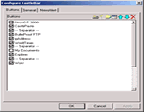
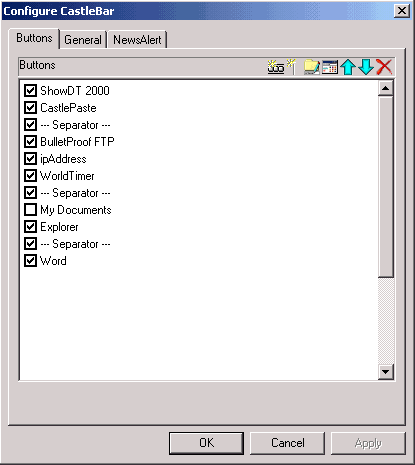
Buttons don't have to stay in the order that you add them.
You can change the order of the buttons easily at any time using the configuration menu.
You can even temporarily disable buttons if you don't want them to appear on the tool bar now,
but may want them back later at the click of a button.
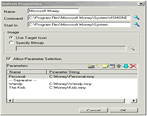
There are times when you want to open a different file with the same program.
Adding a separate button would take up valuable space on the screen, so CastleBar allows each button
to be configured with multiple parameters. When you click the toolbar button, CastleBar drops down
a list of your configured parameters and allows you to choose one.
| Software Information |
System Requirements |
| Version: | 2.50.1 |
- Windows 95 / 98 / ME, Windows NT 4.0 (SP4 or later), Windows 2000 / XP or newer.
- 8MB RAM.
- 16-bit Colour Display (65536 colours).
- 5MB Free hard disk space.
- Windows Common Controls v5.
|
| File Size: | 1.36 MB |
| License: | Free to try, $15.00 to buy |
| Rating: |  |
Key Features of CastleBar :
- Allows simple, fast access to applications and folders.
- Configure as many buttons as you like.
- Allows drop-down parameter lists.
- Snap to titlebar area or float over applications.
- Easy configuration.
- Use your own bitmaps if you want to.
- Check for updates across the Internet.
- Runs under Windows 95, Windows 98, Windows NT (SP4 or later), Windows 2000.
- Online help on the Web.
Benefits and uses:
- Save desktop space. Use CastleBar to launch your favourite applications instead of keeping icons on the desktop.
- Save space on the taskbar. Your taskbar is crowded enough, displaying all of those running applications,
without having a whole bunch of shortcuts there as well.
- Be organized. CastleBar lets you group buttons using separators. Having a well organized
toolbar will save you time and effort every day.
- Save yourself time. Stop hunting though multiple levels of Start Menu items and configure
your favourite applications on the CastleBar launcher.
- CastleBar works the way you do. Have it as a floating toolbar which can be dragged to
wherever you like, or keep it out of the way in the titlebar area of maximized windows.
- Pass parameters to your applications using easy drop-down options, to open applications
in different ways or with different documents or settings.
- Forget that cluttered Favourites menu in your browser. Set up your most important
Internet sites on a single CastleBar button.
| More Screenshots - Click each image to enlarge! |
|
|
|
RELATED SOFTWARE DOWNLOADS FOR MAPSOFT BOOKMARKER
- Remove Toolbar Buddy
Remove Toolbar Buddy is a essential utility to delete unwanted toolbars and other Internet Explorer add-ons such as buttons, menus and browser helper objects
- Accessor.Launchbar
It is a toolbar that is used to quickly launch programs, open files and Internet URLs with one mouse click on the screen.
- FireFox Okapiland Search Toolbar
It is a Firefox toolbar to provide Internet search in Composite Page Mode that displays linked pages themselves in addition to hyperlinks.
- IE Okapiland Search Toolbar
It is an IE toolbar to provide Internet search in Composite Page Mode (CPM) that displays linked pages themselves in addition to hyperlinks.
- Built-in RSS Client
is an MS Internet Explorer toolbar for handling with RSS feeds. You can read, search and store RSS feeds through your habitual Internet Explorer.
- StartGuard Pro
is the next generation spyware cleaner for your PC
- Search From Office
is a Office add-in that adds search abilities directly to the Office toolbar
- Excel Utility Pro
is a very friendly Excel Utility with customized toolbar and no ads or the same
- febooti ieZoom toolbar
is a Internet Explorer toolbar - browsers / webmasters tool
- Mapsoft BookMarker
Using the simple BookMarker dialog you can create multilevel bookmarks to any depth easily and quickly.
|
|





 BestShareware.net. All rights reserved.